

The API Call action allows your AI assistant to interact with external systems, services, or databases by sending HTTP requests. It supports all major HTTP methods and allows for custom pre/post-processing logic in Python. This action is ideal for dynamic integrations like sending data, retrieving external information, triggering backend processes, or interacting with third-party APIs.Documentation Index
Fetch the complete documentation index at: https://docs.monobot.ai/llms.txt
Use this file to discover all available pages before exploring further.
What It Does
When triggered, this action performs a direct HTTP request to the specified API endpoint. You can define the method, payload, and optionally include pre-processing and post-processing logic to manipulate the request or handle the response.Use this for real-time data exchange or logic branching based on external API responses.
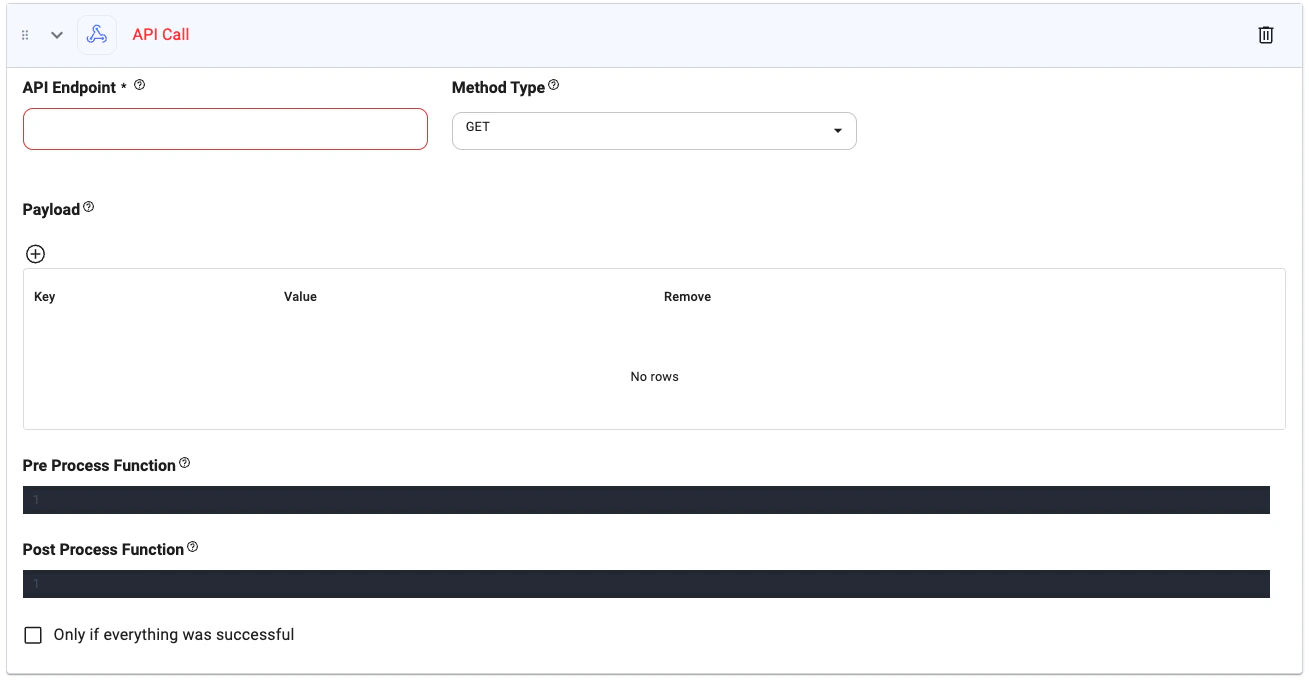
Action Interface
Configuration Options
API Endpoint (required)
API Endpoint (required)
Type:
string
The complete URL of the API endpoint to call.Example: https://api.example.com/usersMethod Type (required)
Method Type (required)
Type:
string
HTTP method used for the request. Choose from:GETPOSTPUTDELETE
GETHeaders
Headers
Type:
Key-value pairs sent with the request to provide metadata such as authentication, content type, or API configuration.Example:
objectKey-value pairs sent with the request to provide metadata such as authentication, content type, or API configuration.Example:
Payload
Payload
Type:
object
Key-value pairs to include in the request body or query params.Example:Pre Process Function
Pre Process Function
Type:
python
Python function that runs before the API call. Useful for preparing parameters or transforming data.Example:Post Process Function
Post Process Function
Type:
python
Python function that runs after receiving the API response. Use this to extract data or format it for the next step.Example:Only if everything was successful
Only if everything was successful
Type:
boolean
When checked, the next action will only execute if this API call completes successfully.Tips
- Use
@parameterin the endpoint, payload, or code for dynamic inputs. - Chain this with message generation or conditional actions based on response data.
- Return JSON or structured data to power follow-up tools like decision branches or summaries.