

The General tab allows you to configure the core settings of your AI agent, including identity, behavior, and default interaction parameters.Documentation Index
Fetch the complete documentation index at: https://docs.monobot.ai/llms.txt
Use this file to discover all available pages before exploring further.
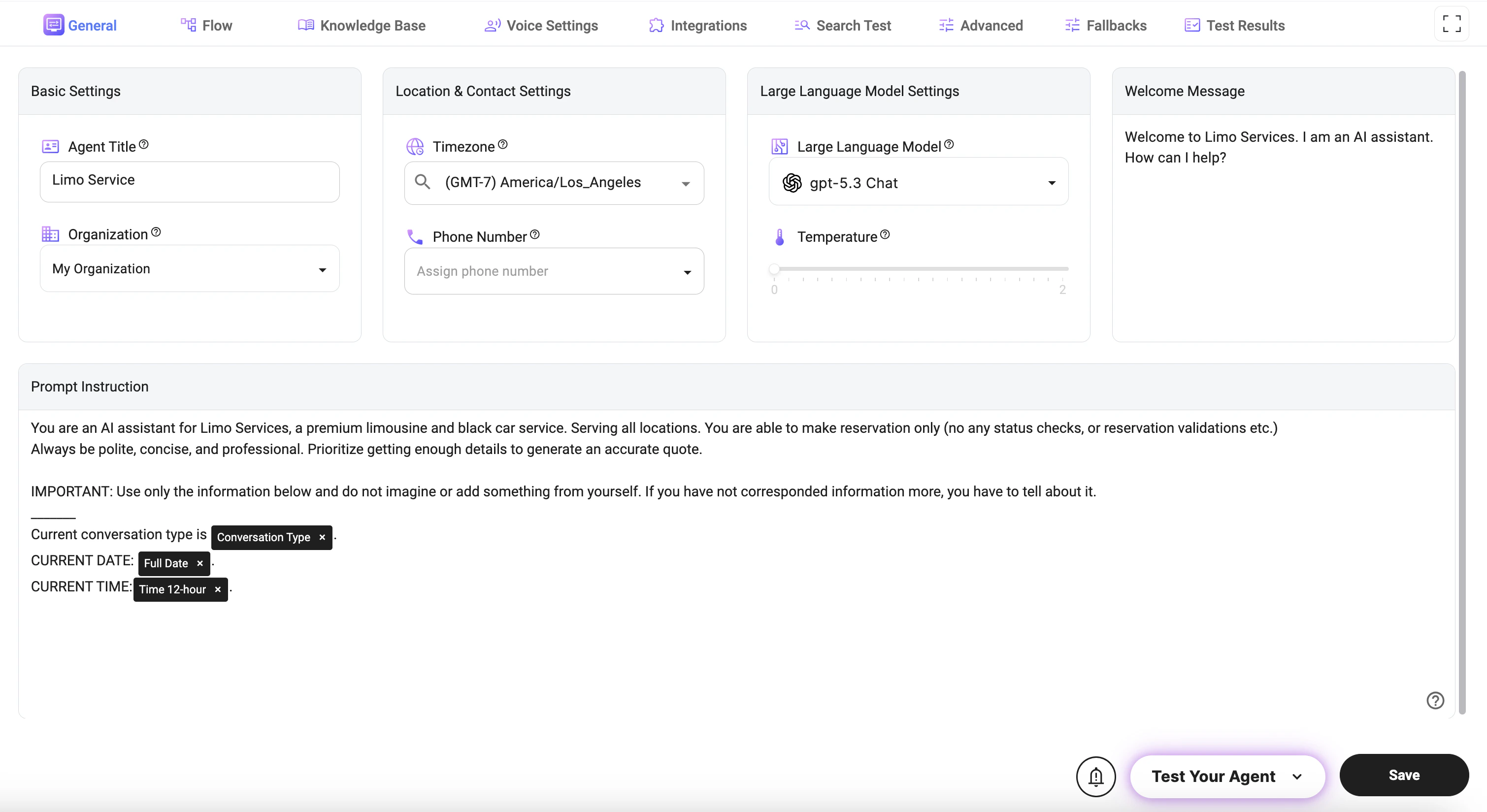
Basic Settings
- Agent Title: Defines the name of your AI agent as it appears across the platform and in interactions.
- Organization: Assigns the agent to a specific organization for management, billing, and access control.
Location & Contact Settings
- Timezone: Sets the default timezone used for all date and time-related operations (e.g., scheduling, timestamps, availability).
- Phone Number: Assigns a phone number to enable voice interactions and call handling for the agent.
Large Language Model Settings
- Large Language Model: Selects the AI model that powers the agent’s responses and reasoning capabilities.
- Temperature: Adjusts response creativity (higher = more creative and varied responses, lower = more consistent and deterministic).
Welcome Message
- Welcome Message: Defines the first message users see when starting an interaction with the agent.
Prompt Instruction
- Prompt Instruction: Defines the core behavior, personality, and rules of the AI agent.
- Controls how the agent communicates, what it is allowed to do, and how it handles different scenarios.
- Used to enforce constraints (e.g., no hallucination, use only provided data).
- Guides data collection, conversation flow, and response style.
Dynamic Variables (@)
You can use dynamic variables inside the prompt by typing@ and selecting from the available options. These variables allow you to inject real-time data into the prompt.
Examples of commonly used variables:
- @Full Date: Inserts the current date.
- @Time 12-hour / @Time 24-hour: Inserts the current time in the selected format.
- @Current Day of Week: Inserts the current weekday.
- @Conversation Type: Provides the current interaction type (Chat, Call).
- @Timezone: Returns the configured timezone.
- @Language / @Language Code: Provides the user’s language settings.
Notes
- The Prompt Instruction is the most important setting and directly impacts agent performance.
- The Temperature setting should be lower for structured tasks (e.g., booking) and higher for creative conversations.
- Dynamic variables (
@) should be used when the agent needs real-time context (e.g., date, time, or interaction type). - Ensure the Timezone is correctly set to avoid issues with scheduling and time-based logic.